Why your online store loads slowly and what it's costing you
Orbidental's online store took 14 seconds to open. Here's how to check whether yours has the same problem, what usually causes it and what I did to take it from 40 to 97 on PageSpeed.
When I started working with Orbidental, a dental supply distributor with more than 3,000 products online, its store took 14 seconds to open on a phone. Fourteen seconds is an eternity: most people close the tab long before they see the first price.
The worst part is that nobody noticed it from the office. On a computer with good internet the site looked "fine". The problem showed up where the customers are: on their phones, on mobile data, out on the street.
Every tenth of a second counts
This isn't an exaggeration. In a study Google commissioned from 55 and Deloitte, improving mobile speed by just 0.1 seconds raised conversion on retail sites by 8.4%, and how much each customer spent by 9.2% (web.dev, "Milliseconds make millions").
If a tenth of a second moves sales like that, imagine what ten extra seconds do. And there's a hidden cost too: Google measures your visitors' experience and takes it into account when deciding who to show first.
How to tell if your site is slow
You don't need to know how to code. Do this today:
- Go to PageSpeed Insights and paste your store's address.
- Look at the Mobile tab, not desktop. That's where most customers are lost.
- Find the Core Web Vitals box. If it says "Failed", Google is already seeing a real problem in your site's visits.
- Open your store on your own phone, on mobile data and away from home. Count the seconds until you can tap a product.
These are the three numbers Google considers good (web.dev, "Web Vitals"):
| Metric | What it measures | Good |
|---|---|---|
| LCP | How long the most important part of the screen takes to appear | 2.5 seconds or less |
| INP | How long the page takes to respond when you tap something | 200 milliseconds or less |
| CLS | How much the content "jumps" while it loads | 0.1 or less |
The four most common causes
Almost every slow store I review has at least one of these:
- A heavy page builder. Tools like Divi or Elementor make it easy to build pages without code, but they load a lot of code your page doesn't use. At Orbidental it was more than a megabyte of unused code on every visit.
- Unoptimized images. Product photos weighing several megabytes, in old formats, and the same size for a phone as for a giant screen.
- Too many plugins and third-party scripts. Chats, pixels, sliders and pop-ups that add up one by one until the page can't handle them all.
- Hosting or settings that don't help. No caching, no compression and a server far from your customers.
What I did at Orbidental
Orbidental's problem couldn't be fixed with a speed plugin: the weight was in the page builder itself. So I rebuilt the store in clean code on WordPress, without Divi.
Over six weeks I migrated more than 3,000 products, taking care of every address (URL), every piece of text and every technical signal. That's the scary part, and for good reason: one mistake there and months of Google rankings disappear. I also optimized the images so each phone gets the size and format it needs, and redesigned the store so it looked as serious as the company.
Within a month, Google's report went from "Failed" to "Passed", and PageSpeed went from 40 to 97.
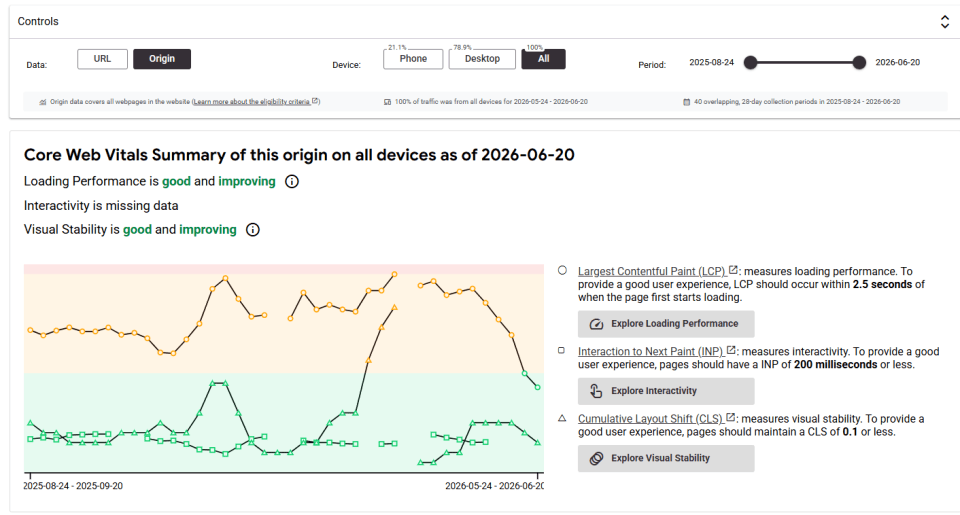
Today the store opens in about 2 seconds on a phone, scores 96 for accessibility and 100 for technical SEO, and Google's history shows the improvement is holding. Traffic went up too.
Fix it or rebuild it?
You don't always have to start from scratch. My rule is simple:
- It can be fixed if the site is well built and the problem is heavy images, too many plugins or no caching. A few weeks of careful work can change the numbers.
- It's better to rebuild if the weight comes from the foundation, like a page builder or a theme that loads everything on every page. You can patch it, but the speed ceiling stays low.
Either way, the first step is to measure. Without numbers, any change is a guess.
Common mistakes when trying to speed up a store
When an online store is slow, the first thing many people do is install another plugin. Sometimes it helps a little, but these mistakes are very common:
- Stacking one speed plugin on top of another. Two caching or optimization systems can conflict with each other and break the site.
- Only measuring on desktop. The desktop version almost always scores better. Your customers buy from their phones.
- Compressing photos until they look bad. The goal is to serve the right size and a modern format like WebP or AVIF, not to ruin the product photo.
- Changing addresses (URLs) without redirects. If you rebuild the store and pages move to new addresses without redirecting the old ones, Google loses track and traffic drops.
Speed, SEO and AI search
Speed also affects how people find you. Google recommends offering a good page experience, and a slow store loses visits before customers see a single product. AI answers work in a similar way: they need to read your content as text and need your site to respond well. I explain it in how to show up in ChatGPT and Google.
To start today
- Test your store on PageSpeed Insights, on the Mobile tab.
- Open your site on your phone with mobile data and count the seconds.
- Check the file size of the photos for your most-viewed products.
- List the plugins and scripts you have installed and remove the ones nobody uses.
- If Core Web Vitals don't show as passed, you already have a concrete reason to act.
If you'd like, send me your store's address and I'll tell you what I would do first. You can also see how I handle web design and development or book an SEO + GEO audit to measure the whole site.
Frequently asked questions
How fast should an online store load?
Google considers it good when the most important part of the screen appears in 2.5 seconds or less (LCP), the page responds in 200 milliseconds or less (INP) and the content barely shifts while loading (CLS of 0.1 or less).
How do I measure my store's speed?
Go to PageSpeed Insights, paste your store's address and look at the Mobile tab. Also check the Core Web Vitals box, which shows data from real visits.
Does speed affect SEO?
Yes. Google takes page experience into account, and a slow store loses visits and sales before customers see the products.
Will a speed plugin fix the problem?
It helps when the problem is caching or images. If the weight comes from a page builder or the theme, the plugin is just a patch and the speed ceiling stays low.
Will rebuilding my store hurt my Google rankings?
It can if addresses change without redirects or if text and technical signals get lost. With a careful migration, like the one for Orbidental's 3,000+ products, rankings hold.